tui98.net Tui98 Tui98.net
Choose a language

How to Enable APK Installation Permissions on Samsung, Xiaomi, and OPPO Phones (Android)

281
How to Enable APK Installation Permissions on Samsung, Xiaomi, and OPPO Phones (Android)

Installing APK files from outside the Google Play Store is a common practice when users want access to apps that are not officially available on Google Play. However, Android devices block these installations by default for security reasons.

In this article, you’ll learn how to enable APK installation permissions step by step on Samsung, Xiaomi, and OPPO smartphones, using the latest Androi

What Is “Install Unknown Apps” on Android?

“Install unknown apps” is a security feature in Android that prevents apps from being installed from sources outside the Google Play Store.

Important to know:

  • There is no global “Unknown Sources” switch on modern Android
  • You must grant permission per app (browser or file manager)
  • This helps protect your phone from malware

How to Enable APK Installation on Samsung Phones (One UI)

Samsung

https://tui98.net/wp-content/uploads/2026/01/More_security_settings1-1.png24origin_png24
https://tui98.net/wp-content/uploads/2026/01/Unknown-Sources-Samsung-Install.webp
https://tui98.net/wp-content/uploads/2026/01/app-permission-2-1.png24origin_png24

Applicable to:

  • Samsung Galaxy S / A / Note / Z series
  • One UI on Android 10+

Step-by-Step Instructions:

  1. Open Settings
  2. Tap Biometrics and Security (or Security)
  3. Select Install unknown apps
  4. Choose the app you used to download the APK
    (Chrome, Samsung Internet, or File Manager)
  5. Enable Allow from this source

You can now open the APK file and install it normally.

How to Enable APK Installation on Xiaomi Phones (MIUI / HyperOS)

Xiaomi

https://tui98.net/wp-content/uploads/2026/01/xiaomi-how-to-allow-deny-install-apps-from-unknown-sources-android-11-miui-12-0-step-2-21529.webp
https://tui98.net/wp-content/uploads/2026/01/xiaomi-mi-11.webp
https://tui98.net/wp-content/uploads/2026/01/xiaomi-how-to-set-privacy-and-security-settings-android-11-miui-12-0-step-5-23562.webp

Applicable to:

  • Xiaomi, Redmi, POCO devices
  • MIUI or HyperOS (Android 10+)

Step-by-Step Instructions:

  1. Open Settings
  2. Go to Privacy & Security or Security
  3. Tap Install unknown apps
  4. Select the browser or 檔案管理員
  5. Enable Allow from this source

If installation is blocked:

  • Go to Security
  • Temporarily disable MIUI Security Scan
  • Re-enable it after installation

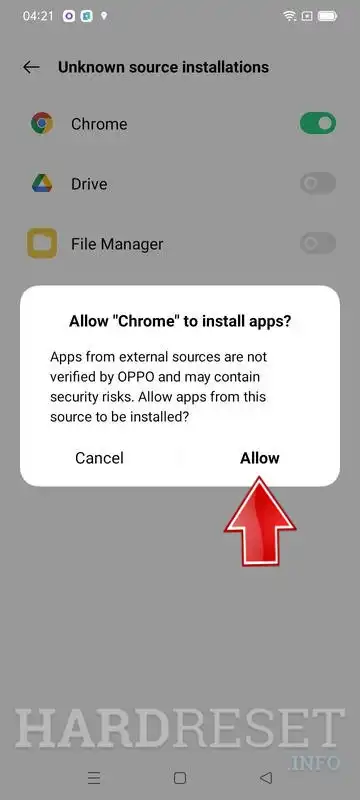
How to Enable APK Installation on OPPO Phones (ColorOS)

OPPO

https://tui98.net/wp-content/uploads/2026/01/oppo-how-to-allow-app-installations-from-unknown-sources-android-11-coloros-11-0-step-2-28012.webp
https://tui98.net/wp-content/uploads/2026/01/oppo-how-to-allow-app-installations-from-unknown-sources-android-11-coloros-11-0-step-4-28014.webp
https://tui98.net/wp-content/uploads/2026/01/oppo-a94-5g.webp

Applicable to:

  • OPPO Reno, A series, Find series
  • ColorOS on Android 10+

Step-by-Step Instructions:

  1. Open Settings
  2. Tap Privacy
  3. Select Install unknown apps
  4. Choose your browser or 檔案管理員
  5. Enable Allow from this source

On newer ColorOS versions, the path may be:
Security → External app installation

Common APK Installation Issues and Solutions

“App Not Installed” Error

Possible causes:

  • Corrupted APK file
  • App not compatible with your Android version

Solution: Re-download the APK or use a newer version.

Google Play Protect Blocks Installation

  1. Open Google Play Store
  2. Tap your profile icon
  3. Select Play Protect
  4. Tap ⚙️ Settings
  5. Turn off Scan apps with Play Protect

You can turn it back on after installing the APK.

Can’t Find “Unknown Sources”

✔ This is normal on modern Android
✔ Permissions are managed per app, not globally

Security Tips When Installing APK Files

✔ Download APKs only from trusted websites
✔ Enable permission only for the specific app you use
✔ Disable the permission after installation if not needed
✔ Avoid granting unnecessary permissions (SMS, Contacts, Accessibility)
✔ Use antivirus or built-in security tools if available

Conclusion

By following this guide, you can safely enable APK installation permissions and install apps outside the Google Play Store on:

  • Samsung phones (One UI)
  • Xiaomi phones (MIUI / HyperOS)
  • OPPO phones (ColorOS)

This method works on most modern Android devices and ensures both convenience and security.

還沒有評論 :(

資訊
登入或 註冊 發表評論
×