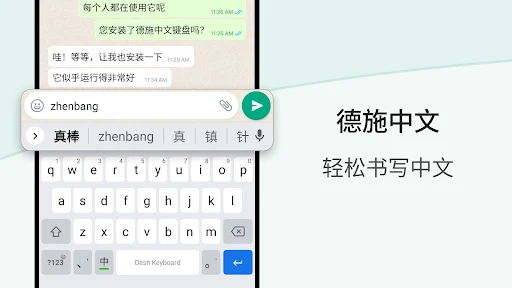
Desh Chinese Keyboard lets you type in English characters which gets instantly converted to Simplified Chinese using phonetics.
– English to Chinese typing: write phonetically in English to get Chinese
– Browse stickers from your phone and send them directly inside messaging apps
– Works inside all apps – a Chinese typing keyboard app for social media and messaging apps
- Recherchez et ouvrez facilement les applications installées sur votre téléphone et découvrez de nouvelles applications qui vous intéressent grâce à notre fonction de recherche d'applications.
Installation and set up is easy.
– Open the app to enable and choose the keyboard. A standard warning may be shown when you enable any downloaded keyboard app
– Choose a keyboard theme or create your own photo to the keyboard
– You can now type Chinese everywhere!
– To change the keyboard, press and hold the Space key
Amazing features. Simple and easy.
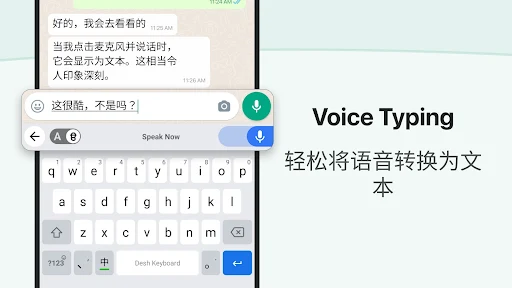
– Type in Chinese faster: start typing in English and choose Chinese word suggestions for what you're typing. This is the easiest method for English to Chinese typing
– Browse stickers: Choose and send any sticker on your phone inside messaging apps. Storage permission is required to enable this feature.
– Use the language button to switch between English and Chinese. English words suggestions are also available.
– An emoji bar is included to select emojis faster. Click on the emojis button to view all emojis. Press and hold emojis to change skin tones.
– The keyboard theme can be changed from settings. You can also create your own photo theme.
– No more typing with slow manual keyboards – choose this Android Chinese Transliteration Keyboard that is free, fast, effortless and easy to use.
Love it? Choose Premium.
– Suggest new features and help make the app better
– Get a fully ad free experience
Safe & secure. We respect your privacy.
– No personal information or credit card details are collected. A standard warning is shown by Android for all keyboards that you download.
– Anonymous statistics may be collected to improve your experience.
Share your suggestions by emailing us at apps@clusterdev.com
Whats News of Chinese Keyboard - Pinyin
- Sauvegarder le statut WhatsApp en balayant vers le haut 💾
- Enregistrez les autocollants dans vos favoris 📌N'hésitez pas à nous faire part de vos commentaires - cela nous aide à continuer !















Il n'y a pas encore de commentaires :(